
Behind the Scenes: THRIVE Christmas Cover Creation
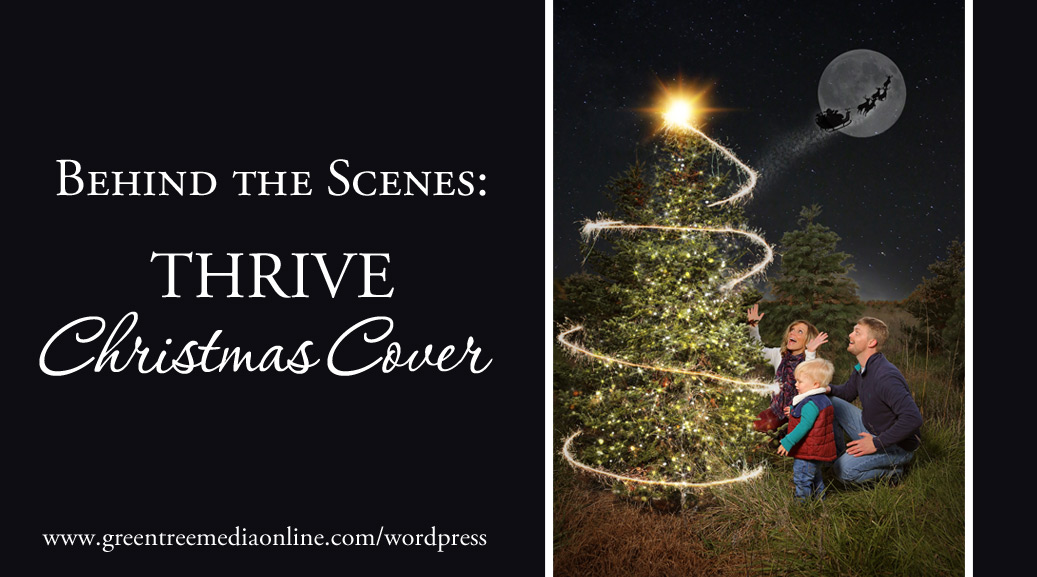
On Friday I shared a peek at the shoot and final product for the THRIVE Christmas cover shoot. It occurred to me however that you might be curious how I actually took the original photo and used my photoshop magic to give it some extra life! With my composite work, I often go in with an idea in mind and then the real work comes into play after the fact.
For this particular piece, I started with an adorable base image of the Golden family. I simply dropped in a night sky behind them to give that Christmas night feel I was hoping for. To create the magical light effect on the tree, I used a photoshop action that created these lights and simply went in and painted the action effects onto the areas where I wanted it. I want there to be a star on top so for that I used a sunburst overlay and added a sparkler swirl over the top of the tree. I added layer and used a moon photoshop brush for the nice big full moon in the sky and then dropped in a Santa and sleigh silhouette over the top.
I know the best way to get the full effect is just to watch. So here ya go! Enjoy the timelapse!
 Previous post
2016 THRIVE Christmas Gift Guide
Previous post
2016 THRIVE Christmas Gift Guide
 Next post
Merry Christmas!
Next post
Merry Christmas!